

 Your No-code and AI Automation Partner
Optimize task management in Trello
Automate task prioritization and deadline management in Trello using Zapier. Seamlessly integrate with Google Calendar and Slack to ensure critical tasks are never missed, enhancing team collaboration and efficiency.

Trigger when a card is moved to 'priority' list.

Add task deadline to Google Calendar.
Notify user before the task deadline.

Notify team of the priority task and deadline.
- Repeat -
Automation Benefits
Automation Benefits
Discover the benefits of integrating Trello with Google Calendar and Slack.
Improved Task Management
Effortlessly prioritize and manage tasks with automated workflows.
Time Savings
Free up valuable time by reducing manual task management.
Enhanced Visibility
Ensure deadlines are visible and accessible to the entire team.
Real-time Notifications
Receive immediate alerts for important tasks and deadlines.
Reduced Errors
Minimize human error by automating task reminders and notifications.
Scalable Solution
Easily scale your task management as your team grows.
Features
Key Features
Explore the standout features of automating task management in Trello.
- 1Seamless Integration
Connect Trello with Google Calendar and Slack for smooth task management.
- 2Automated Reminders
Receive automatic reminders for task deadlines, reducing manual oversight.
- 3Enhanced Collaboration
Keep the entire team informed with instant Slack notifications.

Outcomes
Expected Outcomes
Achieve significant improvements in project management and team productivity.
30%
40%
50%
More Automation Use Cases
Potential Automations for Your Business
Explore what processes can be automated in your HVAC company. Start increasing revenue and growing business from today.
Scale your impact with custom Chat Bots
Book appointments for your customers instantly - based on free slots in your CRM or employee availability. Classify leads before bookings, eliminating unqualified requests - no more wasted time.
Ask me anything and watch how I respond.
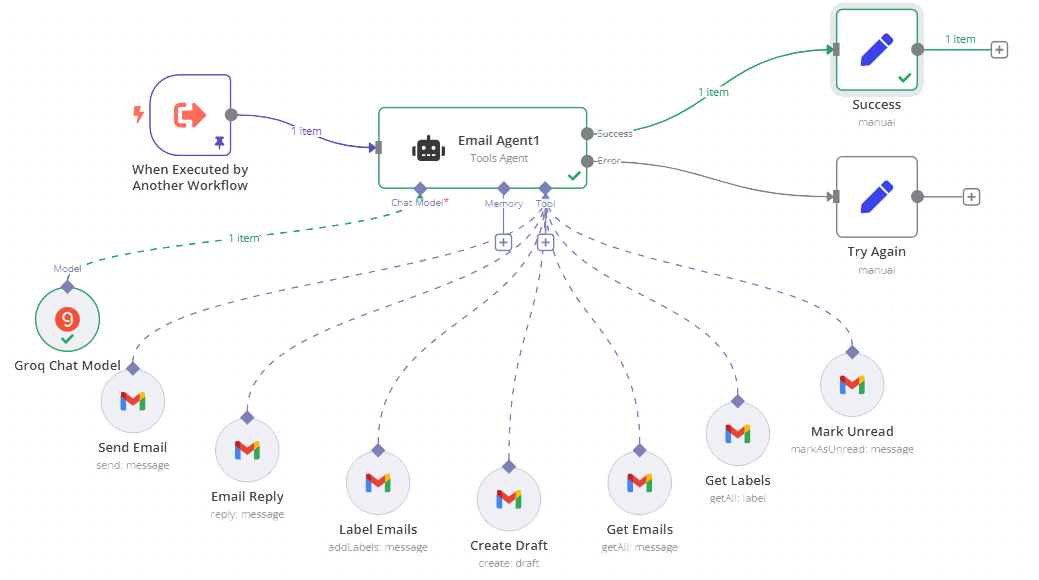
Smart Email AI assistants for your Inbox
From automatic email responses - to scheduling appointments with customers. No manual work, just AI handles your scheduling. Respond to your client emails promptly - based on previous response history, using your writing style.
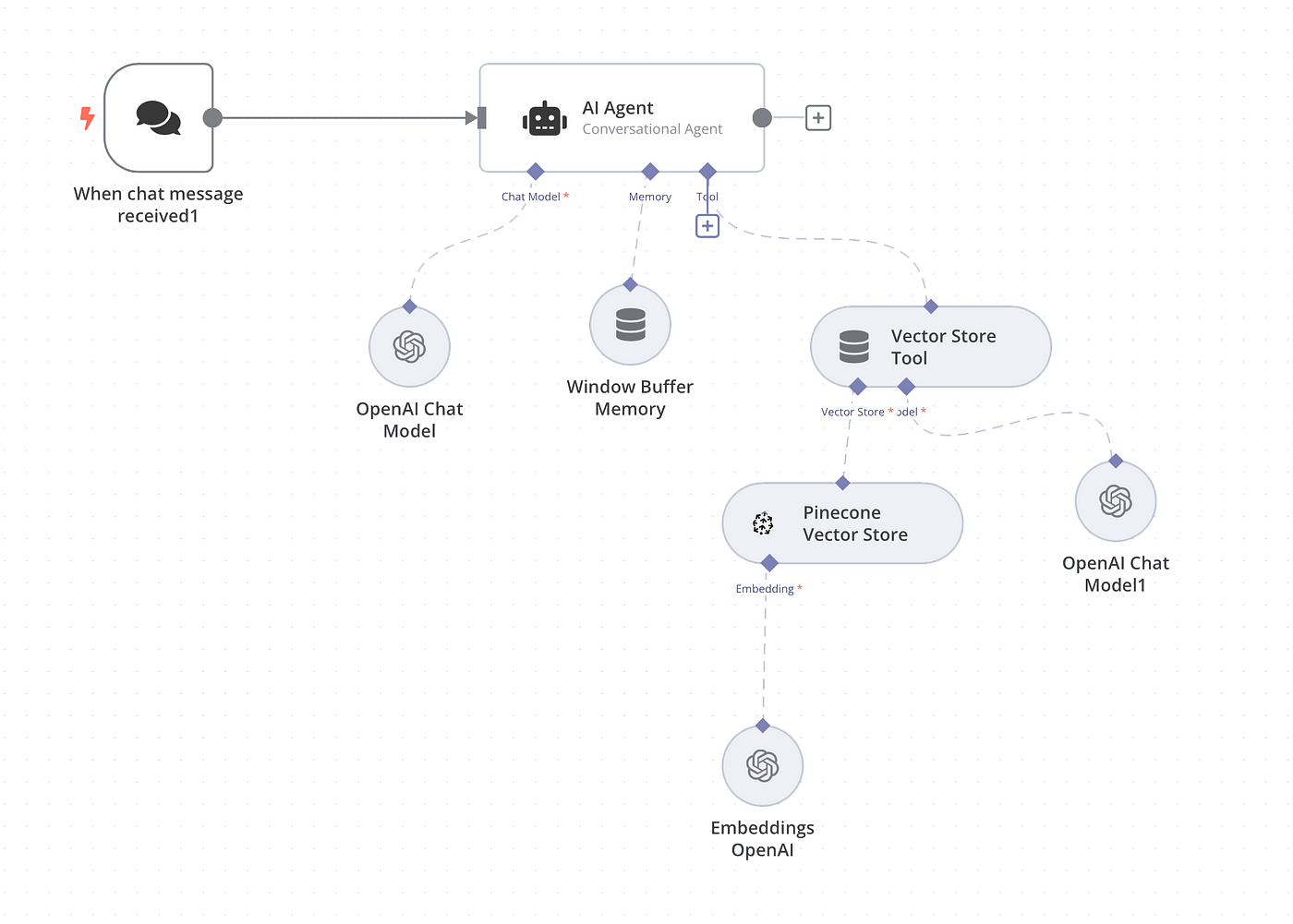
Put your internal knowledge to work with RAG AI
RAG Automation (Retrieval-Augmented Generation) lets AI pull real answers from your documents, databases, or wikis - so you get accurate, context-aware responses every time. Perfect for support, onboarding, knowledge sharing, and internal Q&A.
FAQs about Trello Automation
Get answers to common questions about automating Trello task management.
How does the Trello integration with Google Calendar work?
Can I customize Slack notifications for different teams?
What if I need to adjust the reminder time?
Will this automation affect my existing Trello setup?
How secure is the data transfer between Trello, Google Calendar, and Slack?
Can I deactivate the automation if needed?
Is there a limit to the number of cards this automation can handle?
We Might Have Solved Your Problems Already
Explore Similar Automations
See how you can improve your work process even more by leveraging AI and Automation.
















Pricing Plans
Our pricing plans
Choose a plan that is suitable for your needs.
Pay once for build out.
Custom project build (template / blueprint)
You choose platform (n8n, Zapier or Make)
Follows your requirements
Integrates with your systems
Paid after build maintenance
No recurring charges monthly
Pay for build + lower recurring maintenance fee.
Custom project build
We choose best platform
Follows your requirements
Integrates with your systems
Maintenance, priority email / Slack support
Monthly recurring charges, 3+ months contract
Use our pre-built solution with no changes.
Existing solution access (no source code)
No platform selection
Integrates as described / documented
Integrates with specific systems and software
Maintenance, priority email / Slack support
Monthly recurring, 3+ months contract required

Ready to Move Forward?
Join the automation strategy call
You will get guidance what tools to use for your automation idea.
And high level overview how the process would look like from technical perspective.