


 Short answer
Key facts
Make: key facts
Billing, plans, apps and hosting.
| Feature | Make |
|---|---|
| Website | make.com[4] |
| Pricing page | make.com/en/pricing[2] |
| Billing unit | Credits (operations until August 2025)[2, 3] |
| What uses a unit | 1 credit per module run, triggers included, even when a polling trigger finds nothing. Routers and filters use none[3] |
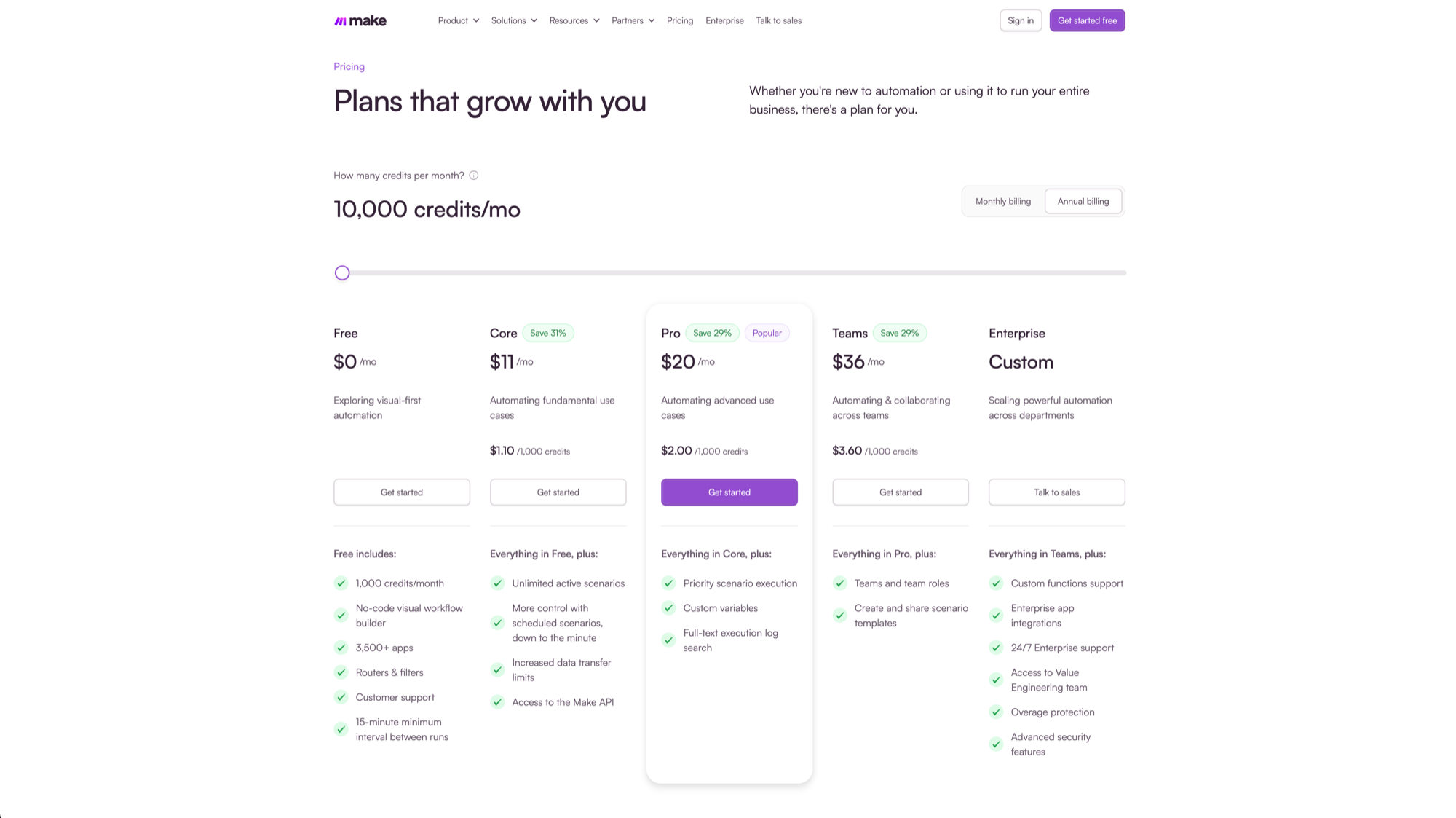
| Entry paid plan | $11/mo billed yearly, $16 monthly (10,000 credits)[2] |
| Yearly billing discount | 19.57% to 31.25%, highest on Core at 10,000 credits[2] |
| Plans | Free, Core, Pro, Teams, Enterprise[2] |
| No-cost option | Free plan: 1,000 credits/mo, 2 active scenarios, 15 min interval[2] |
| Integrations | 3,500+ apps[2, 4] |
| Hosting | Cloud only. Enterprise runs in a separate AWS environment[5] |
| Data regions | EU and US data zones[6] |

Overview
Make in depth
How Make works
Make calls a workflow a scenario. Modules sit anywhere on an open canvas, and a Router splits the flow into routes that all run when their filters match. Make has also offered If-else and Merge since March 2026: If-else runs only the first true route, and Merge joins the branches back.[3, 4]
Make says it connects 3,500+ apps. It has been part of Celonis since 2020, has its headquarters in Prague and employs more than 380 people.[1, 4]
What you pay for
Make switched its billing unit from operations to credits on 27 August 2025, at a 1 to 1 ratio. Every module run uses 1 credit per item it processes. Routers, filters and error handler modules use none. The trigger uses 1 credit per run, and a polling trigger uses 1 credit for each check, even an empty one.[3]
Core costs $11 a month billed yearly for 10,000 credits, or $16 monthly. Many comparison articles still quote $9. The Make pricing page showed $11 when we checked it on 28 November 2026.[2]
Where it falls short
Make is cloud only, and a single run stops after 45 minutes. Extra credits cost 25% more than the credits included in a plan, and Core stops at 300,000 credits a month. Long data jobs and very high volumes need care on Make.[7, 8, 9]
Cost
What a five-step workflow costs
One trigger and four actions, run 1,000, 10,000 and 100,000 times a month, on the cheapest plan that fits.
How each number was worked out
The workflow has one trigger and four actions, processes one item per run, and uses no AI or code steps. Each price is the cheapest plan whose allowance covers the volume, from the list price on the vendor pricing page.
- Make, 1,000 runs/mo: 1,000 runs × 5 modules = 5,000 credits, with an instant (webhook) trigger. A polling trigger adds 1 credit per check.[2, 3]
- Make, 10,000 runs/mo: 10,000 runs × 5 modules = 50,000 credits. Core 40,000 and 10,000 extra credits at the 25% premium come to about $60 monthly.[2, 3, 8]
- Make, 100,000 runs/mo: 100,000 runs × 5 modules = 500,000 credits. Core stops at 300,000 credits a month.[2, 3, 9]
Discount for paying yearly
- WEXTL16.67% to 56.14%up to 56.14% off with yearly billing
- Zapier31.83% to 33.54%up to 33.54% off with yearly billing
- Make19.57% to 31.25%up to 31.25% off with yearly billing
- n8n16.67%16.67% off with yearly billing
- Activepieces16.67%16.67% off with yearly billing
Features
Features
Builder, code, error handling, AI agents, MCP and team features.
| Feature | Make |
|---|---|
| Builder | Open visual canvas with modules placed anywhere[4] |
| Branching | Router (all matching routes) and If-else with Merge[3] |
| Code steps | JavaScript and Python on paid plans (Make Code)[10] |
| Error handling | Retry, Resume, Rollback, Break, Ignore handlers. Run replay on all plans[7, 11] |
| Versioning | Saved versions kept for 60 days[12] |
| AI agents | Make AI Agents since May 2025 (paid plans). New app with sub-agents and MCP tools since Feb 2026[13, 14] |
| MCP | Make MCP server on all plans, MCP client[15] |
| Users | No seat limit published. Teams and roles on Teams plan[2] |
| Active workflows | 2 on Free, unlimited on Core and up[2] |
| Templates | Public template gallery, shared templates on Teams[2] |
| Developer tools | Custom apps, REST API, TypeScript SDK, Make CLI[2] |
Limits and ratings
Run limits and ratings
| Feature | Make |
|---|---|
| Max run time | 45 minutes (10 minutes on Free)[7] |
| Shortest schedule | 15 min on Free, down to 1 minute on paid plans[2, 16] |
| Concurrent runs | Parallel capacity in processing units, per-plan numbers not published[17] |
| Error recovery | Retry, Resume, Rollback, Break, Ignore handlers. Run replay on all plans[7, 11] |
Longest run a single workflow can take
- WEXTL24 hours
- Make45 min
- n8n Cloud40 min
- Activepieces10 min
| Review site | Make |
|---|---|
| G2 | 4.6/5 (524 reviews)[18] |
| Capterra | 4.8/5 (406 reviews)[19] |
| Trustpilot | 2.3/5 (177 reviews)[20] |
Pros and cons
Strengths and weaknesses of Make
Each point links to its source.
Make
Strengths of Make
Weaknesses of Make
- Every module uses credits, the trigger included. A polling trigger uses 1 credit per check even when it finds nothing.[3]
- A run stops after 45 minutes (10 minutes on Free).[7]
- Extra credits cost 25% more than plan credits, and Core stops at 300,000 credits a month.[8, 9]
- No self-hosting.[5]
- Code steps need a paid plan and use 2 credits per second of run time.[3, 10]
- We find that Make steers clients to Enterprise above about 1 million operations a month, with quotes from about $50,000 a year. The Pro list price for 1 million credits is $969 a month, or $11,628 a year.[2, 21]
From our client work
What our client work shows
Where Make sits in the client automations StartAutomate builds and maintains.
First-hand data from the StartAutomate team, November 2026. It covers the automations we build and maintain for clients, not the market as a whole.[21]
Where our client automations run
- WEXTL30%
- n8n25%
- Zapier18.75%
- Make15%
- Activepieces6.25%
- Claude workflows5%
How the split changed, 2024 to 2026
- Make45% → 15%−30% percentage points, fell
- Zapier30% → 18.75%−11.25% percentage points, fell
- Activepieces10% → 6.25%−3.75% percentage points, fell
- n8n15% → 25%+10% percentage points, grew
- WEXTL0% → 30%+30% percentage points, grew
- Claude workflows0% → 5%+5% percentage points, grew
View as table
| Platform | 2024 | 2025 | 2026 |
|---|---|---|---|
| Make | 45% | 38% | 15% |
| Zapier | 30% | 27.75% | 18.75% |
| Activepieces | 10% | 9.25% | 6.25% |
| n8n | 15% | 22% | 25% |
| WEXTL | 0% | 1% | 30% |
| Claude workflows | 0% | 2% | 5% |
Credits per order on the same live workflow
- WEXTL9 to 11
- Make16 or more
When we pick each one
- Make
- We pick it when the client needs fast iteration at low scale. Our smallest clients, with 1 to 5 people, are mostly on Make.
What it costs in practice
- Credits per order on that workflow: Make uses at least 16, WEXTL uses 9 to 11, depending on which conditions pass. At 5,000 orders a month that is at least 80,000 Make credits, which needs Core 80k or higher, from $81 monthly ($65 billed yearly), against at most 55,000 WEXTL credits, which fits Grow at $40 monthly ($33.33 billed yearly). WEXTL wins on both ends: fewer credits per run and a lower price per credit.
- Make steers clients toward Enterprise above about 1 million operations a month, and the quotes we have seen start from about $50,000 a year. The Pro list price for 1 million credits is $969 a month, or $11,628 a year.
- Our Make clients have hit all three Make limits in real work: the 45-minute run cap, the 300,000-credit ceiling on Core, and the 25% premium on extra credits.
- We estimate the running cost on each suitable platform up front after a strategy session, with the pros and cons of each, and recommend one platform for each workflow based on its use case. The client makes the final choice, and usually goes with our recommendation.
- Empty polls cost the same on Make and WEXTL: each check uses a credit, even when it finds nothing. The WEXTL saving on that workflow comes from fewer steps per run and a lower price per credit, not from polling.
Building and handing over
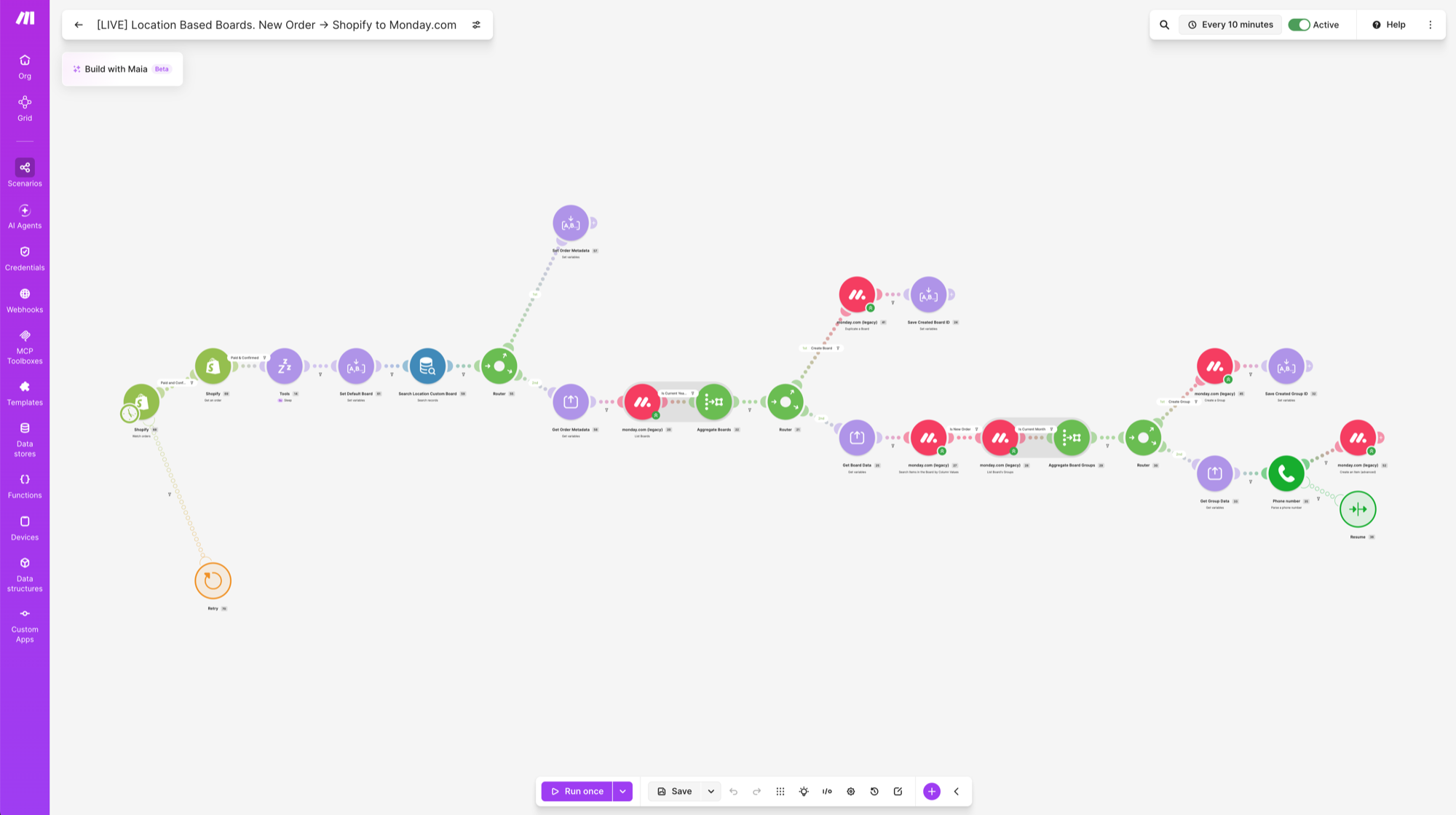
- The Shopify to Monday.com workflow we run on both Make and WEXTL took us about the same time to build and stabilize on Make as on WEXTL. On n8n it would take more effort. On Zapier we would not recommend it to the client at all.
- The same logic adds more steps on Make (routers, set and get variable modules, aggregators). We find the WEXTL version easier to read and hand over.
- Handover to the client team is easier on Make, WEXTL, Activepieces and Zapier. n8n is the hardest to hand over: we document every n8n workflow in detail, all the more because we mostly use n8n for heavy workflows.
- We build that workflow on the platform with a ready connector for the app when the others lack one, which keeps the build simple. Failing that, we call its API with the HTTP step, which all five platforms have. We build our own connectors, such as private Make custom apps, only in rare cases: a custom connector needs its own upkeep, and the client pays for that work.
What breaks and how it gets fixed
- Expired or revoked credentials cause most of the failures we fix, on every platform. It often starts when someone on the client team changes an account. We connect apps through a separate automation account as a rule, but a client admin can still change its permissions and break a workflow.
- API rate limits and timeouts are rarely a problem for us on n8n, Make or WEXTL, because each has retry handling for them.
- Changes in the API of a connected app can break a workflow on any platform, and all of them update their connectors quickly. A fix to a broken n8n node goes through review before it ships in a release, so you wait for it. In practice this is rare: popular apps retire old API versions gradually, and it causes about 1% of the failures we fix, or less.
- Make and WEXTL keep their connector code closed, so only the platform team can update a connector. Make has the older catalog, and in our experience some of its connectors lag behind the API of the app, so a fix can take time. The HTTP step is the workaround. We have also found that some apps on WEXTL come with more modules than the same app on Make.
- A client came to us when the YOURLS app on Make stopped working after an update: its endpoint had gained a stray slash at the end. The client did not want to wait for a fix and wanted a reusable app rather than an HTTP step, so we built a custom Make app for it.
- How fast a broken connector gets fixed depends most on the company behind the app. Every workflow platform has to wait when that company ships API changes slowly or without a clear changelog.
Maintenance load we see
- Make starts to hit limits once workflows scale.
Volumes we run
- 150 clients have automations scheduled daily, which comes to at least about 700 runs per client a month.
- Our heavy clients use 300,000 to 400,000 operations a month.
Clients and hosting
- Most clients work in service businesses, barbershops, IT companies and shop owners and e-commerce.
- Main markets: United States, United Kingdom, Europe, Canada and Australia.
- Make runs for clients across the UK, Europe, Canada and the US.
- Every automation runs in the account of the client, not in a StartAutomate account. The client owns the workflows, the credentials and the bill, and keeps them if the work with us ends.
Moving between platforms
We move workflows between platforms when it makes sense, and some clients run 2 or 3 platforms at once. The choice is made per workflow more than per client. Make, WEXTL and Zapier are where we test a new idea fast. n8n is the clear pick for long-running and script-heavy workflows. In 2024 and 2025 we moved many clients to n8n: Make had no AI agents until May 2025, and by then n8n had taken that ground for our clients, WEXTL was not yet available, Zapier was too simple for the work, and Activepieces lacked apps we needed. Our largest case was an IT company running about 1 million Make operations a month, moved to n8n before WEXTL existed. Today we would move a client like that to WEXTL.
Screenshots
Inside Make
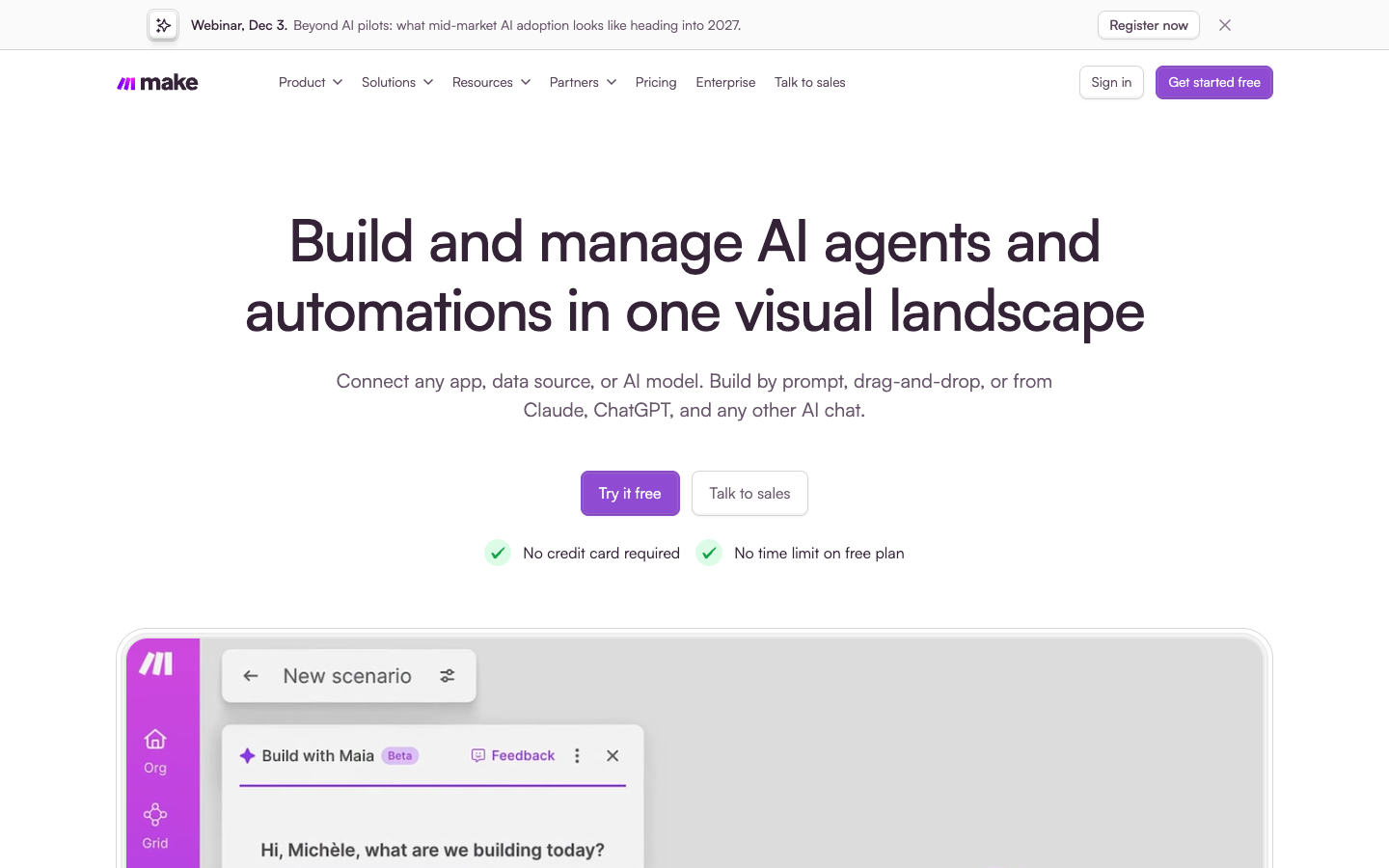
Workflows built by StartAutomate, with names blurred. The Make shot shows a live workflow that files each new paid Shopify order on a Monday.com board for its location. We also run it on WEXTL. See both builders side by side →
Company and compliance
Company, hosting and compliance
| Feature | Make |
|---|---|
| Founded | Integromat in 2015 (per Make), renamed Make in 2022[1] |
| Headquarters | Prague, Czech Republic[1] |
| Company and track record | Part of Celonis, 380+ employees[1] |
| Self-hosting | No. An on-premise agent can reach local apps[5] |
| Source code | Closed source[1] |
| Compliance | SOC 2 Type II, SOC 3, GDPR. ISO 27001 on Enterprise[5] |
| SSO | SAML and OIDC SSO on Enterprise[5] |
Compare
Compare Make
Each comparison covers cost, features, performance and which one to pick.




Sources
Sources
Every source was read on the date shown. 21 sources in total.
- About Make. Make. Accessed 28 November 2026.
- Pricing. Make. Accessed 28 November 2026. Prices shown in USD. Make may localize prices by region.
- How features use credits. Make Help Center. Accessed 28 November 2026.
- Make home page. Make. Accessed 28 November 2026.
- Security. Make. Accessed 28 November 2026.
- AI providers and data zones. Make Help Center. Accessed 28 November 2026.
- Fix errors and warnings. Make Help Center. Accessed 28 November 2026.
- Extra credits. Make Help Center. Accessed 28 November 2026.
- Adjustments to plans and pricing. Make Help Center. Accessed 28 November 2026.
- The Make Code app is available. Make Help Center. Accessed 28 November 2026.
- Scenario run replay. Make Help Center. Accessed 28 November 2026.
- Scenario version control. Make Help Center. Accessed 28 November 2026.
- Make AI Agents: the next step in automation. Make Help Center. Accessed 28 November 2026.
- Meet the new Make AI Agents app. Make Help Center. Accessed 28 November 2026.
- Make MCP server. Make Help Center. Accessed 28 November 2026.
- Schedule a scenario. Make Help Center. Accessed 28 November 2026.
- Parallel capacity. Make Help Center. Accessed 28 November 2026.
- Make reviews. G2. Accessed 28 November 2026.
- Make reviews. Capterra. Accessed 28 November 2026. Read from a search snippet, the site showed a CAPTCHA.
- Make reviews. Trustpilot. Accessed 28 November 2026.
- StartAutomate client work, 2019 to 2026. StartAutomate, first-hand data.